
Shell: Fuel, Charge & More
Shell Information Technology International B.V.Auto & Vehicles
3.17.74K Reviews
- Version
- 9.5.0
- Installs
- 1.00M
- Age Rating
- Mature 17+
Screenshots
Our Review of Shell: Fuel, Charge & More
 Analysis by Appyee
When I’m trying to make a stop without turning a routine drive into a string of errands, I want the basics to be easy to find and the next step to be obvious. Shell: Fuel, Charge & More brings Shell-related driving tasks together, including finding stations, paying for fuel, and keeping an eye on spending. I see its strongest appeal in that practical focus; it is less compelling if you need one app to cover every brand or every part of car ownership.
Readability and navigation for quick decisions
On a small screen, a station finder is most useful when it helps me answer a simple question quickly: where can I stop, and does that location suit my trip? The app is designed around Shell services, so its value depends partly on whether those stations fit the routes I actually drive. I would check a location before setting off rather than assume that a familiar stop will be convenient on every journey.
The app is free, and Shell Information Technology International B.V. is its developer. It sits in the auto-and-vehicles category, where I’d compare it less with a general navigation app and more with a brand’s own fuel and service tool. A navigation app may be better for building a route across many destinations; this one is more relevant when I already expect to use Shell and want related tasks in one place.
Its average rating is 3.2 from around 26,000 ratings, while the app has over a million installs. Those figures suggest it has reached a substantial audience, but they are not a guarantee that every feature will work equally well for every driver. I’d treat it as a useful companion to test on a familiar local trip before relying on it during a time-sensitive drive.
Motor and sensory considerations
For drivers who prefer fewer steps at the pump, being able to arrange payment through an app can reduce the need to handle a wallet or card while refuelling. That can be helpful when one hand is occupied, when reaching a payment terminal is awkward, or when someone simply finds a quick digital routine easier. It does not remove the need to stay attentive at the station, and I would set up any payment details while parked rather than trying to do it during a stop.
People who are sensitive to visual clutter or who find small controls difficult may want to explore the screens at home first. Station details and account tasks are easier to assess when there is no pressure to make a fast decision. If a screen is hard to read in bright daylight or a flow takes too many taps, I would switch to a safer alternative—such as checking the route before leaving or paying at the pump or counter—rather than troubleshoot beside a vehicle.
Situational access on everyday journeys
Consider a weekday trip with a low tank and a meeting soon after arrival. Before leaving, I could check whether a Shell stop is near the route, review the available station information, and make sure the payment setup is ready. That small preparation is more valuable than opening the app only after I have pulled into a crowded forecourt. The same habit helps on unfamiliar roads: decide on a sensible stop while parked, then follow the route without handling the phone while driving.
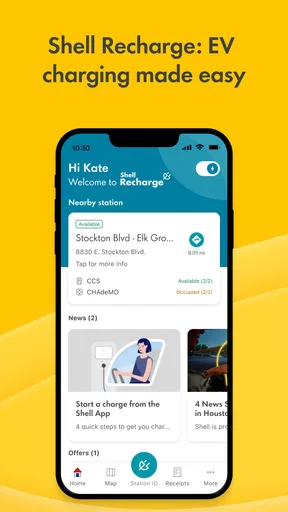
The electric-vehicle charging locator broadens the app’s usefulness beyond petrol stops, but I would still plan a charging break with care. A location shown in an app is a starting point, not a substitute for checking that a stop works for the vehicle and journey. Drivers who depend on charging information should compare it with their usual route-planning tools and allow time for a backup option. That is a practical trade-off: Shell’s app can keep brand-related tasks together, while a specialist route planner may be a better fit for a charging-heavy trip.
Its age rating is Everyone, and the current version is 8.12.0, with Android support beginning at version 7.0. Those details help establish whether a device can run it, but they do not tell me how comfortable the interface will feel on a particular phone. I’d install it and check the station search, payment setup, and account screens when I have time, especially if I rely on larger text, assistive settings, or a particular way of interacting with my device.
Remaining barriers and sensible workarounds
The main limitation is the app’s brand focus. If I routinely choose whichever station is cheapest or closest, a multi-brand map or navigation app may give me a broader comparison. Shell’s app makes more sense when I already intend to visit Shell and want its station information and related account tasks together. Keeping both types of tool available can be more useful than expecting either one to do everything.
Rewards can make repeat visits feel more worthwhile, but I would not let points alone decide where to refuel. A detour costs time, and a reward is only useful if the station suits the trip and the terms make sense to me. A helpful routine is to check the route first, then treat any loyalty benefit as a bonus rather than a reason to make an inconvenient stop.
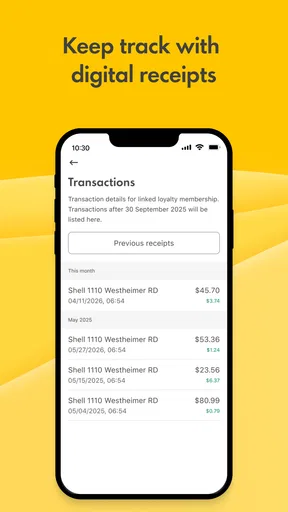
Expense tracking can also be useful without replacing a full household budget. I’d use it to notice patterns—such as whether fuel spending rises during a month with more driving—then keep broader costs in whatever budgeting method I already trust. Before counting on a record for reimbursement or tax paperwork, I would confirm that the app’s available information meets that specific need. A focused fuel view is convenient, but it may not capture every vehicle cost.
As with any app used around a vehicle, the best workflow is the one that keeps attention on the road. I would search, compare, sign in, and sort out payment before setting off or after parking. If a passenger is available, they can handle the phone while I drive; otherwise, a paper note or a preselected stop is safer than trying to make a decision in traffic. Convenience should simplify a stop, not create a new distraction.
A closer look at the day-to-day experience
I find that the most useful test is not how many tasks an app gathers, but whether I can complete the one I need without rushing or losing focus. Here, I’d make a familiar, parked stop my first trial: check a Shell location, explore the payment flow, and note whether the screens are comfortable to use. That gives me a practical sense of fit before considering how it might support less familiar journeys.
Fuel stops, payments, and rewards
Ever found yourself scrambling for a fuel station or struggling to keep track of your car expenses? Well, that’s where Shell: Fuel, Charge & More comes to the rescue! I’ve been using this app for a while now, and it’s become a trusty sidekick for all things related to my car. Let me walk you through my experience.
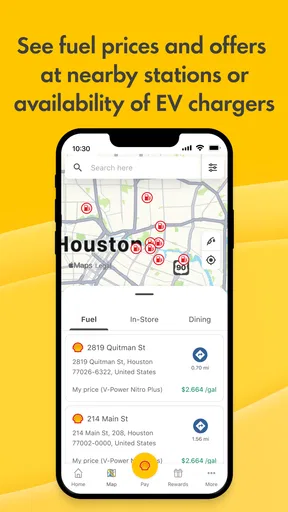
First off, the app is super user-friendly. I mean, who has the time to navigate through a labyrinth of menus? With Shell: Fuel, Charge & More, everything’s right there on the home screen. From finding the nearest Shell station to checking fuel prices, it’s all just a tap away. The app even offers a nifty feature to locate charging stations for electric vehicles. Talk about being future-ready!
Fuel Up Without the Fuss
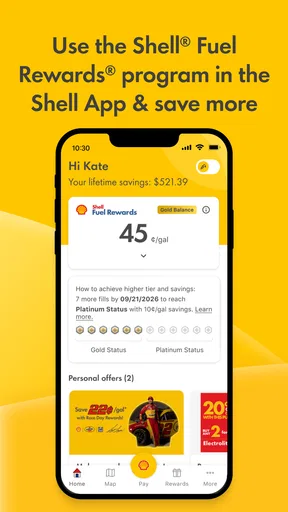
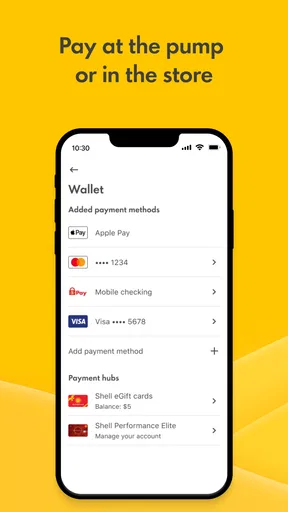
You know those days when you’re running late, and the last thing you want is to fumble around with payment methods at the fuel station? The app’s got you covered with its seamless payment integration. Just link your card, and you’re good to go. Plus, you get to earn loyalty points with every purchase, which can be redeemed for exciting rewards. Who doesn’t love a good deal?
Even so, I’d prepare the account before I need it. Linking a card and understanding the payment steps at home gives me a chance to catch a problem without holding up a queue. I’d also keep a backup way to pay, because a phone battery, connection, or account issue can turn a supposedly quick stop into a frustrating one. Digital payment is most useful as an option, not as the only plan.
Keeping Tabs on Expenses
If you’re anything like me and tend to lose track of where your money goes, the app’s expense tracker will be your new best friend. It categorizes your spending and gives you a clear picture of your monthly fuel expenses. It’s like having a personal accountant in your pocket. Now, I can finally stop scratching my head at the end of the month!
For a driver sharing a car with family, a simple spending view can prompt a useful conversation about how often the vehicle is being used. For someone who drives only occasionally, the same feature may not justify maintaining another account; jotting down occasional fill-ups may be enough. I’d judge the tracker by whether I actually look at it and change a decision, not by the mere fact that it collects information.
Support, updates, and environmental claims
Okay, let’s be real. We’ve all had our share of frustrating customer support experiences. But with this app, it’s a different story. The support team is responsive and genuinely helpful. Whether it’s a query about the app’s features or a technical glitch, they’ve got your back. It’s refreshing to see a company that values its users.
Shell: Fuel, Charge & More was released on September 3, 2018, and it continues to receive version updates; its current version is 8.12.0. I would keep it updated if I use its payment or station features, since a current app is generally the sensible place to start when troubleshooting. If something does go wrong, I’d note what I was trying to do and contact support after I’m safely parked rather than trying to resolve it at the pump.
I’ve got to give a shoutout to Shell for promoting sustainability through this app. They provide tips on reducing carbon footprint and offer incentives for using their eco-friendly products. It’s always nice to see companies taking steps towards a greener future, and this app makes it easy for us to contribute.
I’d treat those prompts as a source of ideas, not as a complete way to measure the environmental impact of driving. For practical day-to-day choices, combining errands, avoiding unnecessary trips, and considering public transport where it fits may matter more than an in-app suggestion. The charging locator is relevant for electric-vehicle drivers, while the broader value of the app still depends on whether Shell locations serve their routine.
Who will get the most from it?
I think this is a good fit for drivers who regularly stop at Shell, want a convenient way to check its locations, and are comfortable managing payment and rewards on a phone. It can also suit someone who likes seeing fuel spending gathered in one place, or an electric-vehicle driver who wants a Shell-focused charging search alongside other planning tools. The free price makes trying it relatively low-commitment, though time spent setting up an account is still a consideration.
I’d skip it—or use it only as a secondary tool—if I rarely visit Shell, need a map that compares many fuel brands, or depend on one app to plan complex charging journeys. I would also avoid relying on it if its controls do not work comfortably with my vision, dexterity, or preferred device settings. In those situations, a general navigation app, another station network’s app, or a simpler payment method may be more dependable for the task at hand.
For someone deciding whether to install it, the useful questions are practical: Are Shell stations on my normal routes? Do I want to pay through the app and collect rewards? Will I actually use its spending view? Can I comfortably read and operate it on my phone? If the answers lean yes, I’d try it on a familiar trip first, while keeping another way to navigate and pay available. That gives a fair test without making an unfamiliar journey depend on a new setup.
All in all, Shell: Fuel, Charge & More is more than just an app; it’s a comprehensive tool for managing your car-related needs. Whether you’re a frequent traveler or someone who just wants to keep things organized, this app is worth a shot. It’s made my life a whole lot easier, and I bet it’ll do the same for you!
An inclusive verdict for real-world use
My recommendation is positive but specific: I’d use it when Shell is already part of my driving routine and I value having fuel, charging, payment, rewards, and spending tasks close together. I would not treat it as a universal travel tool or assume that every screen suits every ability and context. A little setup while parked, a backup payment option, and a second route-planning choice make the experience more resilient.
What matters most is whether the app removes effort for you rather than adding another obligation. If its text and controls are comfortable, its locations fit your routes, and its rewards or spending view are genuinely useful, it can earn a place on your phone. If those conditions are not true, choosing a broader map or a simpler routine is a perfectly sensible decision.
Verdict
Strengths of Shell: Fuel, Charge & More
- User-friendly interface for quick navigation.
- Comprehensive fuel station locator feature.
- Real-time fuel price updates.
- Integrated payment options for convenience.
- Supports multiple languages for global users.
Limitations of Shell: Fuel, Charge & More
- Limited availability in certain regions.
- Requires stable internet for full functionality.
- Occasional app performance lags.
- Some features require registration.
- Notifications can be overly frequent.
Similar Picks in This Category
View All
Android Auto
Google LLC4.1

maxim — order a taxi & food
PT. SITO4.7

Штрафы ГИБДД: проверка с фото
Pays LLC – Штрафы ГИБДД4.7

Номерограм – проверка авто
Авто Ассист4.8

Дром Авто
Дром4.9

Frequently Asked Questions
What features does the Shell: Fuel, Charge & More app offer?
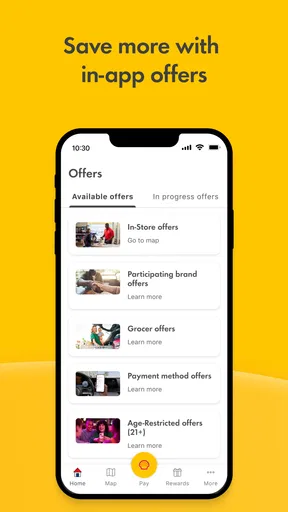
The Shell app provides users with a variety of features, including finding the nearest Shell stations, checking real-time fuel prices, and accessing loyalty rewards. It also offers the ability to pay for fuel directly from your phone, locate electric vehicle charging points, and receive personalized offers and promotions.
Is the Shell app available for both Android and iOS devices?
Yes, the Shell: Fuel, Charge & More app is available for download on both Android and iOS platforms. You can find it on the Google Play Store for Android devices and the Apple App Store for iOS devices, ensuring compatibility across a wide range of smartphones and tablets.
How secure is the payment option in the Shell app?
The Shell app incorporates advanced security measures to protect user data and transactions. It uses encryption technologies to safeguard personal and payment information, ensuring a secure experience. Additionally, the app requires authentication before completing any payment, adding an extra layer of security for users.
Can I earn rewards or loyalty points using the Shell app?
Yes, the Shell app allows you to earn rewards and loyalty points. By registering with Shell’s loyalty programs, you can accumulate points with every purchase, which can be redeemed for discounts or special offers. The app keeps track of your points and notifies you of any available promotions.
Does the Shell app support electric vehicle charging locations?
Absolutely, the Shell app includes a feature to help users locate electric vehicle charging stations. This is particularly useful for EV owners looking to find nearby charging points. The app provides details about each location, including availability and pricing, making it convenient for planning your charging stops.
